
 My Account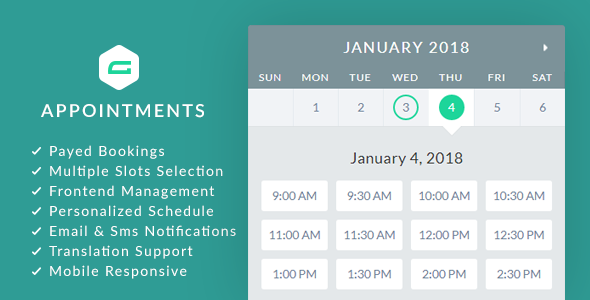
If you’re already using Gravity Forms to collect leads, client details, or inquiries, chances are you’ve wished it could do more—especially when it comes to booking appointments. Imagine transforming your existing forms into a complete scheduling and booking system. One where visitors can choose services, pick times, pay online, and receive confirmations automatically. That’s exactly what gAppointments Plugin does.
This premium plugin adds robust appointment booking functionality to your Gravity Forms setup. It allows you to manage staff schedules, set service availability, charge for bookings, and automate your calendar—all without needing a separate booking system or third-party platform.
In this guide, we’ll walk through everything you need to know about the gAppointments plugin:
-
What it does
-
Who it’s built for
-
Its best features
-
Real-world use cases
-
Pros and cons
-
Setup process
-
Final verdict
Let’s dive in.
What Is gAppointments?
gAppointments is a WordPress plugin that extends Gravity Forms by adding appointment scheduling functionality to any form you create.
You can define:
-
Time slots and business hours
-
Service types and durations
-
Availability per staff member
-
Buffer times between appointments
-
Booking limits per day or week
-
Costs per service or person
-
Confirmation and notification flows
-
Google Calendar sync
This means you can run a fully functional booking platform inside your existing WordPress site—without the need for expensive SaaS tools.
It turns your contact form into an interactive booking engine that manages appointments for you.
Who Should Use gAppointments?
If your business revolves around scheduled services, gAppointments can help.
Ideal for:
-
Doctors, dentists, and clinics
-
Coaches and consultants
-
Barbers and hair stylists
-
Therapists and wellness practitioners
-
Service businesses (cleaning, repair, tutoring)
-
Fitness trainers or yoga studios
-
Freelancers and agencies offering calls or sessions
Basically, anyone who offers a service that requires time-slot bookings can benefit from the gAppointments plugin.
Why Not Just Use a Standalone Booking Plugin?
You might wonder: why not use a standalone booking plugin like Amelia, Bookly, or Calendly?
Here’s why gAppointments stands out:
-
Gravity Forms integration – If you’re already using Gravity Forms for onboarding, client forms, or data collection, gAppointments lets you add booking capabilities without switching platforms.
-
Customization – You get full control over the form fields, layout, validation, and integrations that Gravity Forms offers.
-
Unified user experience – Instead of sending people to another booking tool, you manage everything natively within your site.
-
Cost-effective – It’s a one-time purchase (especially through marketplaces like Themexplug), with no monthly fees.
For businesses that want flexibility, data ownership, and seamless control, gAppointments offers the best of both worlds.
Key Features of gAppointments
Let’s unpack the core features that make gAppointments a true scheduling powerhouse.
1. Appointment Time Slot Picker
gAppointments adds a new field type to Gravity Forms that lets users select available time slots.
You can configure:
-
Start and end times
-
Time slot duration (e.g., 30, 45, 60 mins)
-
Days of the week available
-
Buffer time before/after appointments
-
Lead time for bookings (e.g., book at least 1 hour in advance)
All of this is presented cleanly in a responsive calendar-style interface your users can interact with easily.
2. Multi-Staff Scheduling
Managing multiple team members? gAppointments supports staff assignments, so you can create:
-
Individual schedules
-
Staff-specific services
-
Booking calendars per team member
Each staff member can have their own availability and limits, making it great for salons, clinics, or coaching teams.
3. Service-Based Scheduling
Define one or more services, each with:
-
Title and description
-
Price
-
Duration
-
Staff members assigned
-
Capacity (number of clients per slot)
Users can select the service they want, and the calendar adjusts based on availability and duration. It’s perfect for businesses that offer multiple service types.
4. Google Calendar Sync
Keep your schedule in sync by connecting with Google Calendar. Bookings made via Gravity Forms appear on your Google Calendar instantly, helping you:
-
Avoid double bookings
-
Get reminders on mobile
-
Share calendars across staff or admins
Two-way sync ensures that blocked times in your calendar are respected in your booking form.
5. Accept Payments for Bookings
Using Gravity Forms’ built-in Stripe, PayPal, or credit card payment add-ons, you can charge users when they book a session.
Perfect for:
-
Paid consultations
-
Fitness sessions
-
Coaching calls
-
Event tickets
-
Private lessons
gAppointments even supports conditional logic, so you can display payment fields only when necessary (e.g., for paid vs. free services).
6. Automated Confirmations and Notifications
gAppointments integrates seamlessly with Gravity Forms notifications and confirmations. You can:
-
Send custom emails to clients and admins
-
Display personalized thank-you messages
-
Trigger Zapier or webhook integrations for workflows
Everything runs smoothly from form submission to calendar scheduling to confirmation.
7. Booking Management Dashboard
Admins can view, search, filter, or cancel appointments via the backend. A calendar view gives you a bird’s-eye perspective of your booking schedule.
From there, you can:
-
Manually add/edit bookings
-
Assign bookings to staff
-
View upcoming slots
-
Export data for reports
It’s lightweight but powerful.
8. Time Zone Awareness
gAppointments detects and adjusts bookings for the user’s time zone—ideal for international consultations or virtual sessions.
No more confusion over time conversions or accidental double-bookings.
9. Limit and Control Appointments
The plugin lets you restrict how many appointments can be booked:
-
Per day
-
Per staff member
-
Per service
-
Per user/IP/email
You can also prevent bookings on holidays, weekends, or custom blackout dates.
10. Developer Friendly
Advanced users and developers will appreciate:
-
Action/filter hooks
-
Gravity Forms merge tag support
-
JavaScript event triggers
-
Custom CSS options
-
REST API support
This allows you to deeply customize or extend the plugin’s behavior.
Real-World Use Cases
Here’s how businesses are putting gAppointments to use:
Medical Practice
A clinic uses Gravity Forms + gAppointments to let patients:
-
Choose their doctor
-
Pick an available day and time
-
Select their consultation type
-
Pay co-pay fees via Stripe
-
Get confirmation emails instantly
They manage all bookings from the backend—and sync each doctor’s schedule to Google Calendar.
Hair Salon
Stylists define their own working hours. Customers:
-
Select their service (cut, color, style)
-
Choose their stylist
-
Book online from phone or desktop
-
Add appointment to their calendar
Staff capacity is set to “1 per slot,” avoiding overlaps.
Business Consultant
A solo consultant offers:
-
Free 15-min discovery calls
-
1-hour paid strategy sessions
-
Monthly retainer packages
Each is set up as a separate service. Gravity Forms handles payments, while gAppointments handles time slot logic and confirmations.
Online Tutor
An ESL tutor allows students to:
-
Choose a lesson package (30 or 60 mins)
-
Book times in their own time zone
-
Submit preferences via Gravity Form fields
-
Pay via PayPal at checkout
The tutor manages their weekly availability via gAppointments’ calendar settings.
Pros and Cons
Here’s the honest breakdown:
Pros
-
Adds full booking logic to Gravity Forms
-
Works with multiple services, durations, and staff
-
Syncs with Google Calendar
-
Handles payments and capacity
-
Integrates perfectly with Gravity Forms add-ons
-
One-time cost—no monthly fees
-
Mobile-friendly and responsive
-
Highly customizable with CSS or dev hooks
Cons
-
Requires Gravity Forms (paid license)
-
Learning curve for complex bookings
-
No native Zoom or video link generation
-
Limited frontend booking management (for users)
Still, for most appointment-based businesses, these downsides are easily outweighed by the flexibility and power gAppointments brings.
How to Set It Up
Setting up gAppointments is straightforward:
Step 1: Install Gravity Forms
Make sure you have an active Gravity Forms license and the plugin installed.
Step 2: Install gAppointments
Upload and activate the plugin. It will automatically integrate with your Gravity Forms dashboard.
Step 3: Define Services
Go to Appointments > Services and create services with durations, prices, and assigned staff.
Step 4: Set Availability
Set your business hours, appointment buffers, and time slot rules under Appointments > Availability.
Step 5: Add the Appointment Field to Your Form
Edit a Gravity Form and insert the gAppointments field. Map it to your services and staff.
Step 6: Configure Payments and Confirmations
Use Gravity Forms payment add-ons (Stripe, PayPal) to enable checkout. Set email confirmations and admin alerts.
Step 7: Publish and Test
Embed your form on a page and do a few test bookings to ensure everything works as expected.
You’re now live!
Final Verdict: Is gAppointments Worth It?
If you’re using Gravity Forms and need to handle appointments, gAppointments is one of the best plugins you can add.
It offers scheduling, staff assignment, service logic, payments, and calendar automation—all inside your existing WordPress site. It saves time, boosts customer satisfaction, and lets you control every part of your booking process.
Plus, it scales with you: whether you’re a solo entrepreneur or managing multiple employees, gAppointments adapts to fit your needs.
Download gAppointments on Themexplug
Ready to turn Gravity Forms into a booking powerhouse?
Get gAppointments – Appointment Booking Addon for WordPress today at Themexplug and enjoy:
-
Instant access
-
Unlimited installations
-
Lifetime updates
-
Seamless Gravity Forms integration
-
Full support for scheduling, payments, and calendars
Save time. Book smarter. And manage your appointments without monthly tools or external apps.


