
 My Account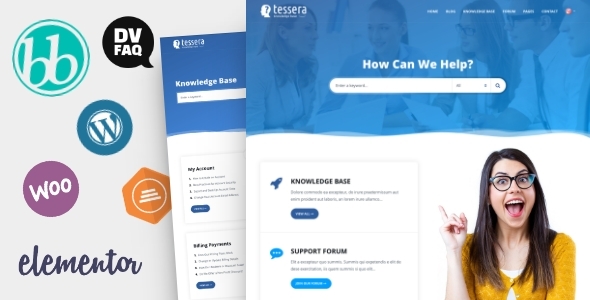
Managing customer support effectively is critical for any business. Whether you run a software company, sell digital products, or offer SaaS solutions, providing structured, self-service support is key to maintaining customer satisfaction and reducing tickets. This is exactly what the Tessera WordPress Theme is built to help you achieve.
Tessera is a versatile and user-friendly WordPress theme designed to power support forums, ticket systems, and knowledge base websites. With clean layouts, powerful integrations, and a focus on usability, Tessera is ideal for businesses looking to centralize their support resources and deliver a better user experience.
In this comprehensive article, we’ll explore what makes Tessera a standout choice for support-based websites. We’ll cover its core features, performance, design flexibility, integration with support tools, and why it fits perfectly for modern customer service needs.
Who Should Use Tessera?
The Tessera WordPress Theme is ideal for:
-
SaaS companies and startups
-
Software developers
-
Theme and plugin authors
-
Online product sellers
-
Hosting providers
-
Community support platforms
-
Digital agencies offering client portals
-
Membership sites with paid support
If your business needs a self-help portal where users can ask questions, get answers, submit tickets, or read documentation, Tessera is a strong and specialized theme for that purpose.
A Clean and Focused Design in Tessera
Tessera provides a professional and focused layout that highlights functionality over distractions. Its interface guides users to find answers quickly, with intuitive navigation and a structured content hierarchy.
Key Design Features:
-
Modern, flat UI for better readability
-
Minimal distractions to improve focus
-
Highlighted search bar for knowledge base queries
-
Clear content categorization
-
List and grid views for forums and articles
-
Optimized typography and spacing
The design is crafted for usability—helping users get support or answers with minimal effort.
bbPress Forum Integration in Tessera
At the heart of Tessera’s functionality is its full integration with bbPress, the leading WordPress plugin for forums. This allows you to create structured, easy-to-manage community discussion areas.
bbPress Features in Tessera:
-
Public or private support forums
-
Categories and sub-forums
-
User roles and permissions
-
Forum statistics and user engagement
-
Topic subscriptions and email notifications
-
Moderation tools for managing content
With Tessera, you can host a robust forum environment that encourages community-based support, user-generated solutions, and engagement.
Knowledge Base Functionality in Tessera
Beyond community forums, Tessera provides tools for building a detailed knowledge base—perfect for tutorials, FAQs, troubleshooting guides, and how-to content.
Knowledge Base Features:
-
Structured article categories and tags
-
Live search with instant suggestions
-
Article feedback (“Was this helpful?”)
-
Author and date metadata
-
Related articles and breadcrumbs
-
Clean reading experience with optional sidebars
Users can easily search, browse, and find relevant content—reducing the need to submit tickets for common issues.
Support Ticket System Integration in Tessera
Tessera is fully compatible with Awesome Support, one of the top helpdesk plugins for WordPress. This turns your site into a fully functioning ticketing platform.
Ticket System Benefits:
-
Front-end submission forms
-
User-specific ticket history
-
Agent assignments and responses
-
Ticket priority and status management
-
Email notifications and attachments
-
Private conversations between users and support staff
This combination of forums, knowledge base, and ticketing makes Tessera a complete support portal.
Elementor Compatibility for Custom Layouts
Tessera is Elementor-ready, allowing you to customize any page visually using the popular drag-and-drop builder.
Elementor Features Include:
-
Header and footer editing
-
Custom homepage design
-
Knowledge base and article templates
-
Contact and FAQ sections
-
Responsive adjustments per device
-
Section reuse and global styles
You can use the pre-built demos as a starting point or design from scratch to match your brand.
Powerful Search and Filtering Tools in Tessera
Tessera offers robust search tools, which are essential in any support-focused website.
Search and Filtering Includes:
-
AJAX live search with dropdown results
-
Keyword highlighting in results
-
Category and tag filters
-
Search bar above the knowledge base
-
Custom query logic and article weighting
Users can get results as they type, helping them find answers quickly without browsing deeply.
User Registration and Profiles in Tessera
Tessera makes it easy for users to create accounts, track tickets, and participate in forums.
User Features:
-
Registration and login pages
-
Profile customization
-
Forum signatures and avatars
-
Topic subscriptions and replies
-
Access control by role
-
Personalized ticket dashboards
A seamless account experience encourages user participation and improves communication.
Blog and Content Marketing in Tessera
While Tessera is designed for support, it also includes blog functionality to share updates, news, or company announcements.
Blog Capabilities:
-
Blog post layouts (classic, grid, list)
-
Categories and tags
-
Featured images and meta data
-
Author bios and comments
-
Sticky posts and pagination
-
Social sharing buttons
Use the blog to drive traffic, announce product changes, or post community updates.
Responsive and Mobile-Optimized
Tessera is fully responsive and optimized for all screen sizes and devices, ensuring your support content is accessible anywhere.
Mobile Features:
-
Mobile-friendly search and menus
-
Optimized article layouts
-
Click-to-call/contact options
-
Forum and ticket access from phones and tablets
-
Responsive images and dynamic resizing
Users can browse knowledge base content and submit tickets on the go without any usability issues.
Speed and SEO Optimization of Tessera
Speed and visibility are crucial for a support website. Tessera is lightweight and optimized for performance and SEO out of the box.
Optimization Features:
-
Fast-loading templates and clean code
-
Mobile-first design principles
-
Integration with caching plugins
-
Support for SEO plugins like Yoast
-
Schema markup for FAQs and articles
-
Lazy loading for images
Your support articles and forum posts will rank better in search engines and load quickly across devices.
Multilingual and RTL Support of Tessera
If you’re supporting global users, Tessera includes full translation readiness and RTL (Right-to-Left) language support.
Language Support Features:
-
WPML and Polylang compatibility
-
RTL layout support for Arabic and Hebrew
-
Translation files (.POT) included
-
Support for multi-language URLs and switchers
Deliver multilingual support without creating separate websites.
Regular Updates and Developer Support
Tessera is actively maintained and updated to stay compatible with the latest versions of WordPress, bbPress, and major plugins.
Update and Support Details:
-
Theme updates via dashboard
-
Detailed documentation
-
Demo import files
-
Developer-friendly code for customizations
-
Fast response time for tickets
-
Clean changelog and version tracking
You’ll never be stuck with an outdated support platform.
Tessera Key Features Summary
| Feature | Description |
|---|---|
| bbPress Integration | Create and manage support forums |
| Knowledge Base Module | Structured documentation and self-help articles |
| Ticket System Ready | Compatible with Awesome Support for tickets |
| Elementor Support | Customize layouts using drag-and-drop builder |
| Live AJAX Search | Instant search results as users type |
| User Profiles and Roles | Support for registration, login, and user roles |
| Responsive and Mobile-Ready | Optimized for all screens and devices |
| SEO and Speed Optimized | Fast loading and better visibility in search engines |
| Translation and RTL Ready | Multilingual website support with RTL capability |
| Blog and Updates Section | Share news, tips, and product updates |
When Should You Choose Tessera?
Choose Tessera WordPress Theme if:
-
You need a dedicated support hub with multiple features in one place
-
Your users submit frequent questions or tickets
-
You want to reduce support load by providing self-service answers
-
You prefer an integrated platform with forums, articles, and tickets
-
You’re building a branded customer support community
-
You want to keep everything on your WordPress site, avoiding third-party tools
Tessera handles both customer service and community interaction, making it more than just a helpdesk theme.
How to Get Started with Tessera
-
Purchase the Tessera theme
-
Install and activate it on your WordPress site
-
Import a demo or set up layouts manually
-
Configure bbPress and Awesome Support (optional)
-
Create categories, articles, and forums
-
Customize the homepage and menus using Elementor
-
Add login/registration and test the user experience
-
Launch your platform and start engaging users
Whether you’re a tech startup or an agency, Tessera gives you the tools to handle support efficiently and grow a helpful knowledge base.
Final Thoughts
The Tessera WordPress Theme is a specialized, all-in-one support system for businesses that want to improve customer satisfaction, cut down on repetitive questions, and provide a helpful, branded experience. Its combination of forums, ticketing, and knowledge base functionality makes it a top-tier choice for self-hosted support platforms.
Whether you’re launching a customer portal for your digital products or building a full community-driven forum site, Tessera delivers the performance, flexibility, and design your users deserve.


