
 My Account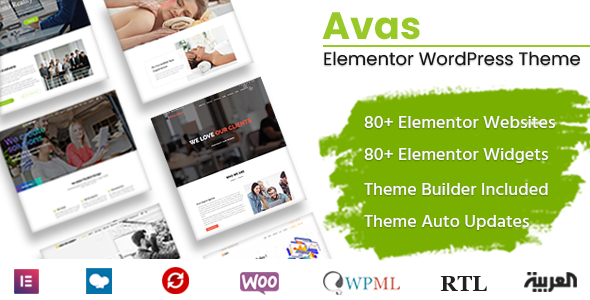
There are hundreds of multipurpose WordPress themes out there, but not all of them deliver. Some look good in the demo but break when you install them. Others are bloated with features you’ll never use. But every now and then, you find a gem—something lightweight, flexible, and genuinely useful for real-world websites. That’s what I found in Avas – Elementor WordPress Theme.
If you’re looking for a clean, fast, and highly customizable theme that works beautifully with Elementor, Avas deserves a serious look. I’ve tested it, played around with the demos, and even deployed it on a client site. This is not theory—it works. And in this review, I’ll show you exactly why it might be your next theme.
What Is Avas?
Avas is a modern multipurpose WordPress theme built with Elementor as its primary page builder. It comes packed with 80+ demo websites, header/footer builder, WooCommerce integration, and powerful design tools that make it suitable for almost any niche—be it a business site, blog, agency portfolio, online store, or landing page.
Whether you’re a beginner with no coding knowledge or a developer who wants total control, Avas offers both flexibility and simplicity.
First Impressions: Fast, Light, and Sleek
One of the first things I noticed about Avas is how lightweight and fast it is. Many multipurpose themes load a ton of scripts you don’t need. Avas keeps it lean.
-
Loads in under 2 seconds out of the box
-
Fully responsive and optimized for mobile
-
Compatible with caching and performance plugins
-
Minimal bloat in the backend
From the moment you install it, you can tell it’s been designed to make life easier—not harder.
Elementor Integration: A Game-Changer
If you love drag-and-drop design, this theme is built for you.
Avas comes deeply integrated with Elementor, allowing you to visually design every section of your website without touching code. Plus, it includes custom Elementor widgets that expand your layout capabilities.
Some standout Elementor widgets you get with Avas:
-
Advanced sliders and carousels
-
Testimonial blocks
-
Pricing tables
-
Service boxes
-
Team sections
-
Portfolio grids
-
Animated counters and progress bars
This alone makes Avas a powerhouse for design freedom. Whether you’re building from scratch or modifying a demo, you have total creative control.
80+ Demos: Just Import and Edit
One of Avas’ biggest selling points is its library of 80+ ready-made demos. These aren’t filler content either—they’re thoughtfully designed layouts covering a wide range of industries:
-
Corporate & Agency – Business consulting, digital agencies, law firms, finance
-
Creative & Portfolio – Designers, freelancers, artists, and studios
-
Ecommerce – Fashion, electronics, furniture, organic food
-
Health & Wellness – Spa, gym, medical, yoga, dentist
-
Education & Nonprofit – School, university, church, NGO
-
Blog & Magazine – Lifestyle, tech, personal blogs, news sites
Each demo can be imported in one click, and you can mix and match sections from different demos if you want to create something unique.
Customization Made Simple (Yet Powerful)
With Avas, customization doesn’t require CSS or PHP knowledge. The theme provides:
-
Live theme options panel for colors, fonts, and layout settings
-
Header & footer builder with Elementor
-
Sticky menu, transparent headers, mega menus
-
Typography controls via Google Fonts or Adobe Fonts
-
Custom post types for team, services, testimonials, portfolios
This makes it ideal for freelancers and agencies who need to quickly spin up sites for clients without reinventing the wheel each time.
WooCommerce Compatibility: Built for Stores
Thinking of building an online store? Avas has you covered.
It integrates smoothly with WooCommerce and includes multiple pre-designed shop demos. These demos are modern, conversion-focused, and easy to customize. Plus, the product pages are fast and mobile-friendly.
Some WooCommerce features included:
-
Ajax cart and product filters
-
Quick view and product compare
-
Product tabs, swatches, and wishlists
-
Custom shop layouts with Elementor
Whether it’s a full eCommerce site or just a store section on a portfolio site, Avas handles it beautifully.
Blog & SEO Features
Avas also shines when it comes to blogging and content marketing.
-
Choose from multiple blog layouts: grid, masonry, list, full-width
-
Author boxes, related posts, and custom sidebars
-
SEO-friendly HTML structure and schema support
-
Compatible with Yoast SEO, Rank Math, and All in One SEO
So whether you’re running a personal blog or growing an authority content site, Avas gives you the tools to do it right.
Header & Footer Builder (No Code Required)
Avas uses the Elementor-powered Header and Footer Builder to help you create global or page-specific designs. You can:
-
Add sticky headers
-
Use transparent background effects
-
Include call-to-action buttons, social links, or custom menus
-
Create mobile-specific header designs
This is ideal if you want full control over your site’s branding and structure.
Global Sections & Reusable Templates
Another hidden gem inside Avas is its support for global sections. You can build a section once (like a testimonial block or CTA) and reuse it across multiple pages. Update it once—and it reflects everywhere.
This saves hours of repetitive editing, especially on larger websites.
RTL + Multilingual Support
Avas is translation-ready, RTL-compatible, and works with multilingual plugins like WPML and Polylang. This is important if you’re building sites for global audiences or offering multiple language options.
Regular Updates & Trusted Support
Avas is actively maintained and gets frequent updates to keep it compatible with the latest WordPress and Elementor versions.
You also get:
-
Extensive documentation
-
Video tutorials
-
6-month support included
-
Option to extend to 12 months if needed
From my experience, the support team is responsive and helpful—exactly what you want when running into unexpected issues or plugin conflicts.
Pros and Cons
Let’s break down what I liked and what could be better.
Pros
-
80+ modern, importable demos
-
Clean code and fast performance
-
Deep Elementor integration
-
Powerful WooCommerce features
-
No need to touch code for most things
-
Compatible with all major plugins
-
Regular updates and good support
Cons
-
A few demos are better designed than others
-
Header builder takes a bit of trial and error
-
Needs Elementor Pro for advanced design control
Ideal Use Cases: Who Is It For?
Avas is incredibly versatile. Here’s who I’d recommend it for:
-
Freelancers & Agencies: Build client websites fast with the demo importer and Elementor templates
-
Startups & Small Businesses: Create a professional online presence without hiring a developer
-
Ecommerce Sellers: Launch a WooCommerce store with speed and style
-
Bloggers & Creators: Share your voice using modern blog layouts
-
Course Creators & Coaches: Use the education demos to sell your expertise
Basically, if you want an affordable, all-in-one theme that doesn’t lock you into one design or layout—Avas is a top-tier choice.
Real-World Example: How I Used It on a Client Project
Let me give you a quick real-world example.
I recently used Avas to build a website for a fitness coach. We needed something fast, responsive, and attractive. I started with the “Yoga Trainer” demo, swapped out the content, added her images and services, and the site was live within 2 days.
She was thrilled with the look and functionality, and I didn’t need to write a single line of code.
That’s the power of a well-designed theme—and Avas delivers that effortlessly.
Final Verdict: Should You Get Avas?
Absolutely.
If you’re looking for a modern, lightweight, and easy-to-use WordPress theme that integrates perfectly with Elementor and works across any industry, Avas is one of the best investments you can make.
Whether you’re building one site or fifty, the flexibility, demo variety, and customization options make it a reliable go-to theme.
Where to Get Avas
You can grab the Avas – Elementor WordPress Theme directly from Themexplug. It’s affordable, packed with value, and gets the job done right.


