 My Account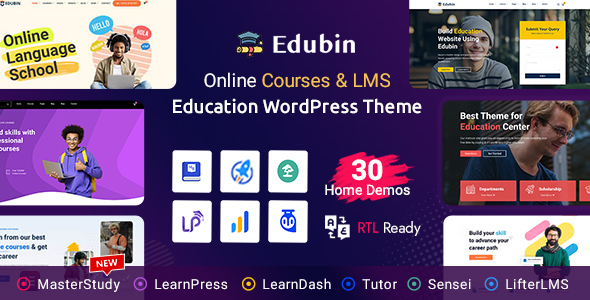
As the education industry continues to shift online, the demand for professional, easy-to-use, and visually compelling education websites has never been greater. Whether you’re running an online school, offering in-person classes, or launching a course marketplace, you need a WordPress theme that’s not only flexible but fully tailored for eLearning success. Enter Edubin — one of the best-selling education themes on ThemeForest.
Edubin – Education WordPress Theme is more than just a sleek template. It’s a full-fledged website-building solution designed for modern educators, instructors, institutions, and ed-tech startups. Backed by powerful integrations like LearnPress, Tutor LMS, and LearnDash, Edubin provides the structure, style, and features to launch a professional learning site fast.
In this detailed review, we’ll explore everything Edubin offers — from demo designs and LMS compatibility to customization flexibility and performance — so you can decide if it’s the right choice for your educational brand or business.
What Is Edubin?
Edubin is a premium WordPress education theme built by Pixelcurve. It’s designed to create modern websites for educational institutions, course platforms, training centers, private tutors, and online schools.
With support for major LMS plugins, one-click demo import, drag-and-drop page building, and deep WooCommerce integration, Edubin makes it easy to build a full-service education website — even if you have no coding experience.
It comes packed with over 25+ homepage layouts, inner pages, course display options, event sections, blog templates, and more.
Whether you’re offering free resources or monetized programs, Edubin is designed to adapt to any learning model.
Who Should Use Edubin?
Edubin is perfect for:
-
Online course creators and eLearning entrepreneurs
-
Universities, colleges, and schools with multiple departments
-
Language or coaching centers looking to digitize classes
-
Private tutors offering one-on-one or small group lessons
-
Educational marketplaces showcasing multiple instructors and courses
-
Corporate training platforms or employee onboarding hubs
-
NGOs or nonprofits offering skill development and workshops
Whether you’re just starting or scaling an established institution, Edubin offers the flexibility and polish to support your growth.
Key Features of Edubin WordPress Theme
Let’s dive into the specific features that make Edubin one of the top choices for education websites on WordPress.
1. Supports Major LMS Plugins
Edubin is built with seamless support for three of the most popular Learning Management Systems on WordPress:
-
LearnPress – The most lightweight, easy-to-use LMS plugin
-
Tutor LMS – A powerful, modern LMS with a focus on frontend experience
-
LearnDash – The premium LMS solution with advanced features
This means you can choose the LMS that suits your needs, without changing your theme.
You can create:
-
Course listings and categories
-
Single course detail pages
-
Quizzes and assignments
-
Course enrollment flows
-
Teacher dashboards and student profiles
Each integration works smoothly and looks professional out of the box.
2. One-Click Demo Import with 25+ Layouts
Edubin includes 25+ pre-designed homepage demos, each tailored to different niches:
-
Online course marketplaces
-
University or college websites
-
Kindergarten and school templates
-
Coaching or instructor pages
-
Ed-tech startup layouts
-
Event and seminar platforms
With just one click, you can import a full website — complete with headers, footers, menus, demo courses, and inner pages.
This saves hours of design work and helps you launch faster.
3. Elementor Page Builder Integration
Edubin is fully compatible with Elementor, the most popular drag-and-drop builder for WordPress.
With Elementor, you can:
-
Customize every section visually
-
Edit headers, footers, course blocks, and buttons
-
Add new elements like counters, tabs, galleries, and CTAs
-
Use 70+ custom widgets provided by Edubin
-
Make responsive changes for mobile and tablet
You don’t need any coding skills — just drag, drop, and publish.
4. WooCommerce-Ready for Paid Courses
Want to monetize your content?
Edubin integrates with WooCommerce, enabling you to:
-
Sell individual courses
-
Offer course bundles or memberships
-
Accept payments via Stripe, PayPal, bank transfer, or local gateways
-
Use coupons or discount codes
-
Display course reviews and ratings
Whether you’re selling a single masterclass or building a full Udemy-style platform, Edubin handles eCommerce with ease.
5. Course Showcase and Filtering
Presentation matters. Edubin gives you multiple course layouts, including:
-
Grid, list, and carousel styles
-
Featured or trending labels
-
Categories and filterable tags
-
Price displays (Free, Paid, Discounted)
-
Instructor highlights
-
Course duration, level, and student count
You can also include quick links to course previews or syllabus overviews — helping students browse and select the right course fast.
6. Advanced Header and Footer Builder
Using Edubin’s header/footer customization tools, you can:
-
Choose from 10+ premade header styles
-
Create transparent, sticky, or mega menu headers
-
Customize fonts, logo placement, and button styles
-
Build custom footers using Elementor
-
Add quick links, forms, or social media buttons
Your branding doesn’t have to compromise. Edubin offers pixel-perfect control over site layout.
7. Event, Seminar, and Calendar Management
Many education sites host:
-
Webinars
-
Workshops
-
Live training events
-
Application deadlines
-
Campus tours
Edubin includes event integration with calendar layouts, countdown timers, event detail pages, and registration buttons — perfect for both online and in-person learning environments.
8. Student and Instructor Dashboards
Depending on the LMS you choose, Edubin supports:
-
Instructor profiles and course management
-
Student dashboards with enrolled courses
-
Certificates upon course completion
-
Quiz results and grade tracking
-
Messaging between students and instructors
-
Wishlist and saved course features
This creates a full LMS ecosystem with engagement tools and performance tracking.
9. SEO, Speed, and Mobile Optimization
Edubin is optimized for performance and discoverability:
-
Clean HTML and Schema markup
-
SEO plugin compatibility (Yoast, Rank Math)
-
Fast load times with optimized assets
-
Lazy loading for images and videos
-
Fully responsive on mobile and tablet devices
-
AMP support for lightning-fast mobile pages
Whether your audience is browsing from smartphones or laptops, Edubin ensures a smooth and modern experience.
10. RTL and Translation Support
Need to launch your education site in a language other than English?
Edubin is:
-
Translation-ready with .pot files
-
Compatible with WPML, Polylang, and other translation plugins
-
Built with RTL support for Arabic, Hebrew, Persian, and more
You can create multi-language or single-language education websites to serve global or regional markets.
Edubin vs Other Education WordPress Themes
| Feature | Edubin | Astra Education | AcademyLMS | eLumine (LearnDash) |
|---|---|---|---|---|
| LMS Plugin Compatibility | LearnPress, LearnDash, Tutor | LearnDash only | AcademyLMS only | LearnDash only |
| Page Builder | Elementor | Elementor | WPBakery | Elementor |
| WooCommerce Support | Full | Full | Limited | Full |
| Pre-Built Demos | 25+ | 5 | 6 | 8 |
| RTL/Translation Ready | Yes | Yes | No | Yes |
| One-Time Purchase | Yes | Yes | Yes | Yes |
Edubin stands out with wider LMS compatibility, more demos, and deeper customization options — making it a smart choice for users who want flexibility without sacrificing usability.
Pros and Cons
Pros
-
Compatible with all major LMS plugins
-
Large library of demos and pre-built templates
-
WooCommerce-ready with modern shop layouts
-
Excellent support for Elementor customization
-
SEO-optimized and mobile responsive
-
Instructor/student dashboard functionality
-
Event management and course filtering
-
Multilingual and RTL support
-
Regular updates and theme improvements
Cons
-
Too many options might overwhelm beginners
-
Best experience requires an LMS plugin (which may cost extra)
-
Some demos include stock images that need to be replaced
-
Elementor dependency (may not suit users of other builders)
Pricing and Licensing
Edubin is available on ThemeForest for a one-time license fee of $49.
This includes:
-
All features and templates
-
6 months of developer support (extendable)
-
Lifetime theme updates
-
Documentation, tutorials, and demo import tools
Given the range of features and integrations, Edubin is one of the best values for money in the education WordPress space.
Real-World Use Case Examples
-
Online School or Academy: Run a full LMS platform with Tutor LMS or LearnPress, offer paid courses, live Zoom sessions, and completion certificates.
-
University Website: Highlight departments, faculty members, course catalogs, and admissions info, with application links and event registration.
-
Course Marketplace: Build a Udemy-style site where multiple instructors can sell their own courses, track revenue, and receive payouts.
-
Language Learning Platform: Offer video-based courses, tests, and learner forums in multiple languages with WooCommerce integration.
-
Coaching or Tutoring Business: Launch a clean, conversion-focused website with booking forms, session pricing, and client reviews.
Final Verdict: Is Edubin Worth It?
If you’re building an education website using WordPress — whether it’s for online courses, a school, or a training business — Edubin is easily one of the most comprehensive and future-ready themes available.
Its deep integration with the top LMS plugins, Elementor compatibility, WooCommerce support, and flexible design features make it ideal for both beginners and professionals. From course pages to student dashboards, Edubin provides the structure and tools needed to build a successful eLearning presence.
Whether you’re just getting started or need to scale your platform, Edubin is a strong, strategic choice that’s built for growth.


