
 My Account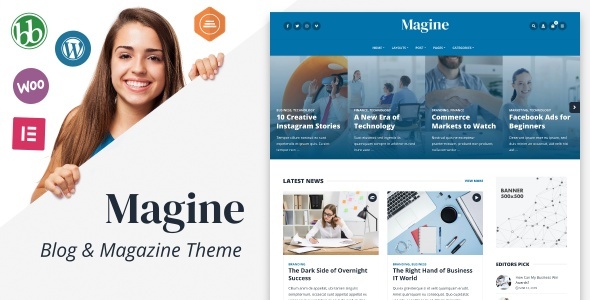
In the modern content marketing world, a business blog is more than a collection of articles—it’s a platform to build authority, communicate your brand story, and attract organic traffic. Whether you’re a solopreneur, startup, or enterprise-level team, you need a blogging platform that balances form and function. That’s where Magine, a WordPress theme designed specifically for professional blogging, makes its mark.
Magine is a minimal, elegant, and performance-optimized WordPress theme built for business blogs, content teams, and corporate media sites. It focuses on clarity, content hierarchy, mobile performance, and flexible customization—making it a great option for professionals who want a reliable platform to share insights, case studies, industry trends, and company news.
In this detailed review, we’ll explore everything you need to know about Magine—from its layout and customization capabilities to SEO performance, plugin compatibility, and real-world use cases.
What Is Magine?
Magine is a premium business blogging WordPress theme developed with simplicity, readability, and performance in mind. It’s specifically crafted for business-related publications—such as professional blogs, digital magazines, company newsrooms, thought leadership hubs, and marketing-driven content platforms.
Best For:
-
Marketing teams and agencies
-
Content creators and professional bloggers
-
Startup and SaaS company blogs
-
Digital magazines and online publications
-
Personal brands and consultants sharing insights
If your business or brand revolves around publishing quality content to inform, educate, or attract, Magine WordPress theme offers the right blend of visual structure and editorial flexibility.
Who Should Use Magine?
Magine is built for professionals who want to:
-
Publish articles regularly and attract SEO traffic
-
Share news and thought leadership content
-
Highlight authors, categories, and trending topics
-
Maintain a clean, distraction-free reader experience
-
Build an editorial brand without coding
Whether you’re a solo content creator, part of a marketing team, or running a niche digital publication, Magine is optimized for clarity, performance, and scalability.
Sleek and Minimal Design in Magine
Magine delivers a sleek, minimal design that keeps the focus on content. Its layout is optimized for reader engagement, content hierarchy, and mobile readability.
Design Features:
-
Grid or list-style blog layouts
-
Sidebar and no-sidebar options
-
Large featured images
-
Clear typography for long-form readability
-
Balanced white space and intuitive navigation
-
Light and dark mode toggle (with plugin or custom CSS)
The result is a clean and polished front-end experience that keeps readers engaged from headline to CTA.
One-Click Demo Import & Layout Flexibility in Magine
Magine comes with demo content designed to replicate a professional business blog. With its one-click demo import, you can set up a fully functional site in minutes.
Demo Includes:
-
Home page with featured articles and categories
-
Blog index page with pagination
-
Single post template with author bio and related posts
-
About and contact pages
-
Optional newsletter opt-in section
-
Search and category filter bar
This structure helps you quickly create a beautiful content hub tailored to your industry or audience.
Customization and Theme Options in Magine
While Magine is minimal out of the box, it provides deep customization through the native WordPress Customizer—no need for a heavy page builder.
Customizable Elements:
-
Header and footer layout
-
Font families and text sizes
-
Color schemes and background settings
-
Sidebar width and positioning
-
Post meta visibility (author, date, categories, tags)
-
Homepage layout (grid, list, masonry)
This means you can tailor your blog to match your brand without bloating the site or affecting performance.
Single Post Layouts & Readability in Magine
Magine offers a clean and well-structured single post template, which is where readers spend most of their time.
Features:
-
Featured image with optional overlay
-
Post meta (author, date, category)
-
Social sharing buttons
-
Author box with photo and bio
-
Related posts carousel or list
-
Comment section (native WordPress)
-
Responsive images and embedded media support
The focus is on long-form content readability—ideal for tutorials, guides, editorials, and opinion pieces.
Category Pages & Editorial Structure in Magine
For blogs with multiple verticals or departments, Magine includes category and tag archive templates to organize content efficiently.
Benefits:
-
Category descriptions at the top of each page
-
Filtered post previews by category or tag
-
Clean URL structures (example.com/category/strategy)
-
SEO-friendly meta and internal linking structure
This structure supports content libraries, knowledge hubs, or editorial publishing schedules for large-scale teams.
Sidebar & Widget Areas in Magine
Magine WordPress theme includes optional sidebars that are useful for:
-
Author bios
-
Recent or popular posts
-
Social links
-
Newsletter opt-ins
-
Promotional CTAs
-
Category or tag navigation
You can toggle the sidebar globally or per-post, offering maximum flexibility without clutter.
Newsletter & Email Marketing Integration in Magine
Magine is optimized for list building. You can easily integrate newsletter services like:
-
Mailchimp
-
ConvertKit
-
ActiveCampaign
-
MailerLite
Using widgets, shortcodes, or plugins like Mailchimp for WP, you can embed opt-in forms in sidebars, footers, or between blog posts to grow your email list with ease.
Author Profiles & Contributor Support
For multi-author blogs or magazines, Magine includes author box support and works well with:
-
Native WordPress user roles
-
Co-Authors Plus plugin (for shared bylines)
-
Custom avatars and social media links
-
Author archive pages (example.com/author/jane-doe)
This is essential for companies that want to build authority around individual team members or industry contributors.
SEO and Speed Optimization of Magine
Magine is lightweight, fast, and structured for SEO—crucial for content-heavy websites.
SEO Features:
-
Clean, semantic HTML5 markup
-
Proper heading hierarchy (H1–H6)
-
Mobile-first responsive layout
-
Image lazy loading
-
Optimized for Google Core Web Vitals
-
Schema support (via plugins like Rank Math or Yoast SEO)
-
AMP-ready (with plugin)
This ensures your blog loads fast, ranks well, and keeps bounce rates low.
Mobile Responsiveness and Performance
With mobile traffic often surpassing desktop, Magine is built to look great and perform smoothly across all devices.
Mobile Features:
-
Responsive grid and image scaling
-
Mobile-optimized menu and navigation
-
Touch-friendly buttons and sliders
-
Font scaling for readability
-
Compatible with AMP plugins for fast-loading articles
Whether users visit from desktop or mobile, they get a seamless reading experience.
WooCommerce Compatibility of Magine
Although it’s a blog-focused theme, Magine supports WooCommerce, allowing you to sell:
-
Digital products (ebooks, templates)
-
Subscriptions or memberships
-
Merch or branded items
-
Coaching sessions or webinars
The shop layout is clean and simple, fitting seamlessly into the theme’s overall aesthetic.
Plugin Compatibility
Magine WordPress theme works smoothly with a wide range of essential WordPress plugins:
-
Yoast SEO / Rank Math – SEO tools
-
Mailchimp for WordPress – Email capture
-
Contact Form 7 / WPForms – Form creation
-
Jetpack – Performance, security, and stats
-
Loco Translate / WPML – Translation and localization
-
Elementor (optional) – For landing page creation
-
Co-Authors Plus – Multi-author blogging
You can also extend with analytics, ad management, and CRM tools for scaling your content strategy.
Support, Updates & Documentation
Magine is a premium theme, typically available on ThemeForest, and includes:
-
6 months of customer support
-
Lifetime theme updates
-
Extensive documentation
-
One-click demo import
-
Child theme for safe customization
Support includes:
-
Theme installation help
-
Compatibility fixes
-
Custom styling guidance
-
General WordPress help (theme-related)
Pros and Cons of Magine
Pros:
-
Sleek, minimalist design perfect for business blogging
-
Optimized for performance and SEO
-
Mobile-friendly and Core Web Vitals compliant
-
Built-in newsletter and sidebar functionality
-
WooCommerce and plugin compatibility
-
Author and editorial structure support
-
Easy setup with one-click demo import
Cons:
-
Not ideal for visual-heavy sites or portfolios
-
No built-in page builder (but works with Elementor if needed)
-
Limited animation or interactive design elements (by design)
Real Use Case Examples
Example 1: Startup Marketing Blog
A SaaS startup uses Magine to create an SEO-driven blog. With categories like “Growth,” “Tech,” and “Product Updates,” they publish bi-weekly content to drive traffic and share team expertise.
Example 2: Consulting Thought Leadership Hub
A solo business consultant builds a blog using Magine’s clean layout to post guides, podcasts, and long-form articles that rank on Google and generate leads.
Example 3: Corporate Newsroom
A mid-size firm sets up Magine to share company announcements, industry insights, and team interviews—organized by department and authorship.
Final Verdict
Magine is a lightweight, elegant, and SEO-ready WordPress theme tailored for professional blogs and business content marketing. It provides everything you need to build a clean, distraction-free platform that focuses on high-quality content, reader engagement, and long-term traffic growth.
Whether you’re a startup sharing product updates, a consultant writing thought leadership, or a brand publishing niche insights, Magine helps you do it with speed, style, and substance.


