
 My Account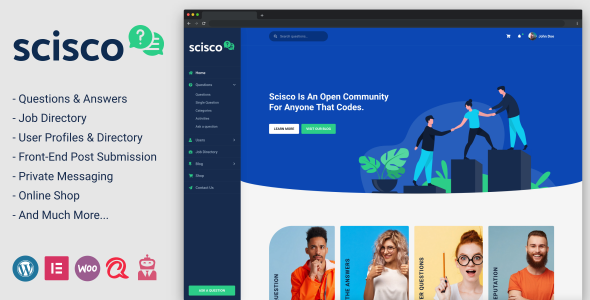
In the age of user-generated content, community-driven knowledge-sharing platforms are more important than ever. Whether you’re building a niche forum, a product support site, or a full-blown Q&A portal like Quora or Stack Overflow, your platform must be fast, user-friendly, and purpose-built for engagement. That’s where the Scisco WordPress Theme shines.
Scisco is a clean, powerful, and fully responsive WordPress theme designed specifically for Q&A websites, community forums, help desks, and support-based knowledge platforms. With built-in user profiles, question-posting features, front-end submissions, and membership options, Scisco empowers you to create a user-driven site that thrives on interaction.
In this in-depth review, we’ll dive into Scisco’s core features, customization capabilities, performance, user experience, and ideal use cases—so you can determine if it’s the right foundation for your next community project.
What Is Scisco?
Scisco is a premium WordPress theme focused on building questions and answers (Q&A) platforms. It blends the core functionality of a forum with the structure of a knowledge base, all while maintaining the ease of use WordPress is known for.
Ideal For:
-
Online Q&A platforms (like Stack Overflow or Quora)
-
Product support and customer service portals
-
Membership-based knowledge hubs
-
Educational communities and peer-help websites
-
Internal team Q&A and employee forums
-
Niche communities (tech, wellness, parenting, etc.)
Whether you want to educate, support, or crowdsource solutions, Scisco is designed to encourage quality content, collaboration, and engagement.
Who Should Use Scisco?
Scisco WordPress theme is great for:
-
Entrepreneurs building knowledge-sharing communities
-
Startups looking for a self-hosted customer support solution
-
Educational platforms encouraging peer learning
-
Companies creating internal knowledge bases or employee help centers
-
Niche experts growing a personal brand via user interaction
If your goal is to build a thriving, interactive platform where users ask and answer questions, Scisco is tailored for you.
Clean, Professional Design in Scisco
Scisco delivers a modern, user-friendly design focused on content hierarchy and easy navigation.
Design Features:
-
Minimalist layout with clean typography
-
Prominent search bar and categories
-
User avatars and badges
-
Well-structured Q&A listing format
-
Sidebar filters for browsing by tags or popularity
-
Mobile-first interface
It’s functional, fast, and uncluttered—perfect for encouraging interaction and minimizing friction.
Q&A Functionality Built-In
At its core, Scisco is a fully functional Q&A platform. It allows users to post, answer, upvote, and manage questions directly from the front end.
Core Q&A Features:
-
Ask a question form (front-end submission)
-
Rich text editor with formatting tools
-
Tags and categories for organization
-
Voting system for both questions and answers
-
Best answer selection by author or admins
-
View counts, reply stats, and time stamps
-
Question status indicators (open, closed, answered)
These tools mimic what users are familiar with on large-scale platforms—making your site feel intuitive and professional.
Advanced User Profiles & Member Interaction in Scisco
Scisco comes with a detailed user system that enables full member interaction and personalization.
User Features:
-
Custom profile pages with bios, avatars, and activity stats
-
Dashboard with posted questions, answers, votes, and bookmarks
-
Badges or reputation indicators (points system via plugins)
-
Private messaging support (via additional plugin)
-
Public user ranking and leaderboard functionality
This fosters a sense of community, credibility, and ongoing participation.
Front-End Submissions and Editing in Scisco
Unlike blog-style themes, Scisco emphasizes front-end interaction, meaning users can contribute content without accessing the WordPress dashboard.
Front-End Features:
-
Submit, edit, and delete questions and answers
-
Live status updates (pending, published, closed)
-
Inline editing of content (admins and users)
-
Spam prevention and moderation tools
-
Markdown or visual editor options (configurable)
This ensures a streamlined and safe user experience that encourages active participation.
Custom Question Filters and Browsing Options in Scisco
To help users discover relevant content, Scisco includes advanced filtering tools.
Filters Include:
-
Recent / Popular / Most Answered
-
Unanswered or Open Questions
-
By Category or Tag
-
Custom Search with auto-suggestions
-
User-specific filters (My Questions, My Answers)
This lets users quickly browse through thousands of questions and find exactly what they need.
Categories, Tags & Taxonomy Management in Scisco
Organizing user content is vital in Q&A communities. Scisco provides deep categorization options:
-
Hierarchical categories (Main > Subcategories)
-
Unlimited tags for flexible classification
-
Category-based landing pages
-
Related question suggestions via taxonomy
-
SEO-friendly URLs and breadcrumbs
This structure helps keep your platform tidy and navigable—even at scale.
Monetization & Membership Support in Scisco
Scisco supports various monetization and access control models through third-party plugins:
-
Restrict Content Pro / MemberPress – Limit question posting to members
-
WooCommerce – Sell subscriptions or premium memberships
-
Paid Memberships Pro – Offer tiered access to answers or categories
-
myCRED – Introduce gamification with points, rewards, and badges
-
BuddyPress – Create full community interaction with groups and messaging
This flexibility allows you to build free, freemium, or paywalled platforms with ease.
Blogging and Content Marketing Support in Scisco
Beyond Q&A features, Scisco includes a full blog module—perfect for publishing updates, tips, and SEO content.
Blog Features:
-
List or grid post layouts
-
Category and tag filtering
-
Author boxes and post meta
-
Social sharing buttons
-
Comment system
-
Featured post banners
Combining editorial content with Q&A builds authority and boosts organic traffic.
Customization & Page Building in Scisco
Scisco supports customization via:
-
Native WordPress Customizer
-
Elementor Page Builder
-
Custom widgets (question box, user stats, tag clouds)
-
Header & footer customization
-
Color, typography, and layout settings
No coding needed—just drag, drop, and personalize your community hub.
Mobile Optimization & Responsive Design in Scisco
Scisco is mobile-ready out of the box and designed with responsive principles.
Mobile Features:
-
Collapsible menus
-
Touch-friendly voting and forms
-
Optimized user profile and question layouts
-
Clean mobile typography
-
Fast load times and lazy loading images
Users can participate fully from phones or tablets, no app required.
Speed & SEO Optimization of Scisco
Speed and discoverability are crucial for community-driven sites. Scisco is built with SEO in mind and performs well with caching and optimization plugins.
Performance Features:
-
Lightweight theme framework
-
Compatible with WP Rocket, LiteSpeed Cache, W3 Total Cache
-
Clean HTML5 code and semantic structure
-
Yoast SEO / Rank Math compatibility
-
Breadcrumbs and schema-ready markup
Whether your site is niche or large-scale, this theme is optimized to rank well and load fast.
Plugin Compatibility of Scisco
Scisco works seamlessly with the most popular WordPress plugins:
-
Elementor – Drag-and-drop builder
-
bbPress – Optional forum integration
-
BuddyPress – Community & messaging
-
WPML / Loco Translate – Multilingual support
-
Yoast SEO / Rank Math – Search optimization
-
WooCommerce – Paid memberships or donations
-
Restrict Content Pro / MemberPress – Access control
-
myCRED – Reputation and gamification
You can also extend with analytics, backups, security, and user moderation tools.
Licensing, Support & Updates
Scisco is a premium WordPress theme available through ThemeForest and includes:
-
6 months of expert support (extendable)
-
Lifetime theme updates
-
Detailed online documentation
-
Demo content for easy setup
-
Child theme included for safe customizations
Support covers:
-
Theme setup and plugin integration
-
Styling and layout issues
-
Customization help
-
Bug fixes and compatibility questions
Pros and Cons of Scisco
Pros:
-
Purpose-built for Q&A and community interaction
-
Clean and modern UI
-
Front-end submissions, voting, and editing
-
Elementor and BuddyPress compatible
-
SEO-friendly and responsive
-
Membership and monetization support
-
Scalable for large communities
Cons:
-
Not suitable for eCommerce-only or blog-first websites
-
Requires user base to grow value (like any forum)
-
Some features need third-party plugins (points, access control)
Real Use Case Examples of Scisco
Example 1: Tech Support Portal
A software company uses this theme to create a customer-driven Q&A portal where users ask setup questions, vote on best practices, and access support content.
Example 2: Education Peer Forum
An online education startup builds a community for students to ask and answer questions about coursework, certifications, and job prep—all hosted with Scisco.
Example 3: Niche Wellness Community
A yoga instructor launches a Q&A-based content site where health-conscious users share remedies, vote on advice, and earn reputation badges using Scisco + myCRED.
Final Verdict
Scisco is one of the best WordPress themes available for building question-and-answer communities, support portals, and knowledge-sharing platforms. It combines a sleek design with robust user interaction tools, flexible customization, and plugin support to help you launch a successful, scalable Q&A site.
Whether you’re building a niche learning community, a tech support hub, or a content-driven knowledge base, Scisco delivers the structure and features to keep users engaged, informed, and active.


