
 My Account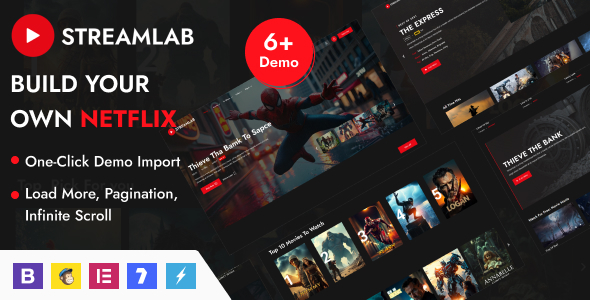
With streaming becoming the dominant form of entertainment and education, building your own video platform has never been more relevant. Whether you’re a content creator, media brand, or entrepreneur looking to launch a video-based site, a high-performing, visually dynamic theme is critical. That’s exactly what Streamlab WordPress theme offers.
Streamlab is a premium, feature-packed WordPress theme built for video streaming websites—ideal for hosting live streams, VOD content, short-form videos, full series, gaming replays, and even membership-based video portals. From Twitch-style channels to OTT (over-the-top) media sites, Streamlab is designed to give you complete control over your video platform, while delivering a polished and immersive viewing experience.
In this in-depth review, we’ll break down what makes Streamlab a strong contender in the video streaming space—including its layout, player features, monetization tools, customization flexibility, mobile responsiveness, and more.
What Is Streamlab?
Streamlab is a modern WordPress theme built specifically for video streaming platforms. It supports on-demand content, live broadcasts, channels, and even user-submitted content. With integrated support for Elementor, YouTube/Vimeo embeds, and a built-in video player, Streamlab is a complete solution for building a professional streaming website without writing code.
Ideal For:
-
Video-on-demand (VOD) websites
-
Live streaming creators and influencers
-
Gaming and esports channels
-
Tutorial platforms and online educators
-
Web series and film producers
-
OTT media companies
-
Video-based membership portals
Whether you want to build a Netflix-like experience or your own streaming hub, Streamlab helps you launch and scale with ease.
Who Should Use Streamlab?
Streamlab is perfect for:
-
Content creators who want to own their video platform
-
YouTubers and streamers looking for a branded alternative
-
Filmmakers or studios distributing episodes, films, or series
-
Coaches and educators hosting video lessons
-
OTT platform startups offering paid video content
-
Event organizers who livestream concerts, conferences, or esports
If your goal is to showcase, manage, and monetize video content, Streamlab is built to help you do it all—visually and functionally.
Modern, Immersive Design of Streamlab
Streamlab has a clean, bold, and content-focused layout. The UI is inspired by streaming giants like Netflix, Hulu, and Twitch—offering a familiar experience for users.
Design Highlights:
-
Hero carousels and featured video sliders
-
Dark and light mode switch
-
Interactive video grids with hover play
-
Category-based navigation menus
-
Player-focused post layouts
-
Mobile-optimized UX with swipe gestures
Everything is designed to keep the user engaged with your content—not distracted by clutter. It’s fast, fluid, and immersive.
One-Click Demo Import & Layout Options in Streamlab
Streamlab includes multiple homepage demos and inner pages, all tailored for video-centric brands and creators.
Prebuilt Demos Include:
-
Streaming homepage with featured slider
-
Gaming/Esports platform layout
-
Movie or film archive homepage
-
Membership or OTT video portal
-
Creator hub and channel grid
-
Vlogger portfolio with video highlights
Each demo includes:
-
Video preview grids
-
About and contact pages
-
Category pages with tags
-
Blog layouts for news or updates
-
Live streaming and countdown sections
You can import any demo with one click, and customize it using Elementor or theme options.
Built for Elementor – Drag and Drop Page Building
Streamlab fully supports Elementor, allowing you to customize every aspect of your video platform.
Elementor Features:
-
Drag-and-drop layout control
-
Custom widgets for video blocks, countdowns, and sliders
-
Live preview editing
-
Reusable templates for headers and footers
-
Easy integration of forms, newsletter boxes, pricing plans
Even if you’re not a developer, you can create a pro-grade streaming site from scratch using Elementor and Streamlab together.
Video Player Features & Embeds
At the heart of Streamlab is a robust, customizable video experience.
Supported Players:
-
Native HTML5 player
-
YouTube and Vimeo embeds
-
External links or self-hosted videos
-
Video thumbnails and preview gifs
-
Lightbox video launchers
-
Option to restrict videos to members
The player includes:
-
Play/pause, full screen, volume control
-
Next video or playlist options
-
Responsive scaling across all devices
-
Lazy load support for faster page speed
Whether your videos are hosted on YouTube or your own server, Streamlab delivers smooth playback and seamless integration.
Live Streaming Integration in Streamlab
Streamlab supports live streams via:
-
YouTube Live
-
Twitch embeds
-
Vimeo Live
-
Custom RTMP or iFrame support
You can:
-
Embed upcoming livestream countdowns
-
Create live event pages with chat
-
Showcase streaming schedules
-
Add “Now Live” banners and filters
This makes Streamlab ideal for creators, musicians, gamers, and live broadcasters wanting a branded experience outside big platforms.
Channel and Series Management of Streamlab
If your platform includes multiple shows, creators, or video series, Streamlab gives you tools to manage it all.
Channel Features:
-
Create custom video channels with profile images
-
Assign videos to specific series
-
Use taxonomies (genres, tags, seasons)
-
Include cast/crew credits, episode numbers, and trailers
-
Add subscription or donation buttons to channel profiles
This structure helps users browse content like they would on Hulu, Netflix, or Crunchyroll—by channel, series, or creator.
Membership & Monetization Options
Monetizing video content is easy with Streamlab. It supports:
-
WooCommerce – Sell access passes, subscriptions, or merch
-
Restrict Content Pro / MemberPress – Lock content behind paywalls
-
Paid Memberships Pro – Create tiered pricing plans
-
Donate buttons and tipping via PayPal/Stripe plugins
-
Sell VOD or downloadable videos
You can create a freemium model, members-only hub, or pay-per-view store—whichever fits your business.
Video Submission & User Uploads
Want to build a platform like YouTube or a multi-creator site? Streamlab supports:
-
Front-end video submission forms
-
Approval workflow for admins
-
User accounts with profile, avatar, and video history
-
Video edit/delete controls for creators
-
Monetization integration for user content
Ideal for building a community-driven video hub with multiple contributors.
SEO and Performance Optimization
Streamlab is built for SEO and speed.
Optimization Features:
-
Schema markup for video content
-
SEO plugin compatibility (Yoast, Rank Math)
-
Lightweight code and fast-loading media
-
Lazy loading for thumbnails
-
Responsive, mobile-first layout
-
Minified assets and cache plugin support
This ensures your site ranks well in Google and delivers a fast, smooth experience for all users.
Mobile-Friendly & Responsive Design in Streamlab
With so much video consumption happening on phones, Streamlab is fully responsive and touch-optimized.
Mobile Features:
-
Swipe-ready video sliders
-
Mobile navigation with toggle menu
-
Tap-to-play interaction
-
Sticky player and mini-cart (if selling content)
-
Auto-adjusting grids for portrait or landscape view
Whether your users are watching on phones, tablets, or desktops, Streamlab adapts seamlessly.
Blog & News Publishing Tools in Streamlab
Aside from video content, Streamlab includes a stylish blog layout—useful for posting news, updates, or creator content.
Blog Features:
-
Featured image headers
-
Sidebar widgets (categories, tags, social links)
-
Author bio and comment section
-
SEO-friendly category and tag archives
-
Social sharing icons and related posts
If you want to drive organic traffic or support your videos with content, Streamlab’s blog section has you covered.
Plugin Compatibility of Streamlab
Streamlab is compatible with major WordPress plugins:
-
Elementor – Page builder
-
WooCommerce – eCommerce and memberships
-
WPML / Loco Translate – Multilingual support
-
Yoast SEO / Rank Math – On-page SEO
-
Mailchimp for WordPress – Newsletter integration
-
BuddyPress – Add community and chat features
-
LearnPress – For combining videos with course material
This makes it a flexible foundation for video-first websites of any scale.
Support, Licensing & Updates
Streamlab is available on marketplaces like ThemeForest and includes:
-
6 months of developer support (extendable)
-
Lifetime theme updates
-
Child theme included
-
One-click demo import
-
Online documentation with setup guides
Support covers:
-
Installation and plugin setup
-
Demo import and Elementor troubleshooting
-
Styling and feature customization
-
Video hosting and embedding best practices
Pros and Cons of Streamlab
Pros:
-
Built specifically for video streaming and on-demand platforms
-
Supports live streams, channels, series, and VOD content
-
Elementor-compatible and easy to customize
-
Mobile-friendly and fast loading
-
WooCommerce-ready for monetization
-
Front-end video uploads for multi-creator platforms
-
Looks and feels like a true streaming platform
Cons:
-
Advanced features (memberships, uploads) may require third-party plugins
-
Self-hosted video may require additional server/storage setup
-
Not ideal for blog-first or text-heavy websites
Real Use Case Examples
Example 1: Independent Streaming Platform
A filmmaker uses Streamlab to create a Netflix-style hub for showcasing independent short films, trailers, and bonus interviews, with WooCommerce to sell premium access.
Example 2: Esports Channel
A gaming brand builds a live stream portal with Twitch and YouTube Live embeds, community chat, countdowns, and monetization via donations and merch.
Example 3: Online Learning Studio
An educator launches a membership-based video platform using Streamlab + LearnPress to deliver structured courses with on-demand video lessons.
Final Verdict
Streamlab is one of the most powerful WordPress themes for building a professional, feature-rich video streaming website. Whether you’re showcasing a single creator’s work, hosting live events, building a subscription-based OTT platform, or creating a community video hub, Streamlab delivers the tools and aesthetics you need to stand out and scale up.
With its sleek design, Elementor support, WooCommerce integration, and focus on video performance, Streamlab turns WordPress into a full-fledged streaming platform—without writing code.


